|
 Speed Startup 2.02.04 Speed Startup 2.02.04 
|
Category: Programs |
|
|
|
Directory
- Programs
- S
- SP
|
File name:
speedstartz.exe Find similar
»
Size: 1 509 946 bytes
(1.44 MB)
Added: 11/07/2008
| Downloaded: 07/10/2016
Updated: 07/10/2016
|
Statistics:
233 total downloads »
|
|
|
Description:
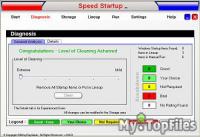 Improves both Startup and Computer System Improves both Startup and Computer System
Don't wait minutes for your computer to run through startup items and don't allow your computer to be slowed down by all of those worthless background programs that are put on your computer.
Gives you Control of Startup
Lets you decide what to run at startup and what not to run. For example, if you don't like some of those icons along the bottom of the screen next to the time, remove their startup item and be free of them.
Run Cleaner with our Unique Four Level Process
Level One - Detect and Remove Useless Items
90% of the items in startup are unneccessary and some, like spyware and viruses, are downright harmful. Even the most hidden items can be found and safely removed.
Level Two - Move Rarely Used items to Manual Run
Why automatically start an item every day that you only use once a month? Put it in the Manual Run section and run it only when you need it.
Level Three - Run Needed Items One at a Time in Lineup
Windows runs all startup items at the same time causing a major bottleneck of resources. Running them one at a time frees up resources and speeds up the whole process.
Level Four - Speed Rebuild Startup Items
Identify Each Startup Item
Our own specialized database and a constantly growing internet database of tens of thousands of startup items are used to inform you about each item, where it hides, and how dangerous it is.
Inspects Secret and Common Startup Locations
Our extensive research has turned up many secret startup locations that other programs like MSCONFIG do not know about.
Locks Annoying Programs Out
Some startup items do not like to be removed and will reinstall themselves. Speed Startup locks out removed items.
Alerts When New Items are Added
You don't have to constantly run Speed Startup to find new startup items. Windows' startup locations are automatically checked for you.
Detailed description »
|
|
|
Download:
 http://regvac.com/speedstartz.exe http://regvac.com/speedstartz.exe
File location: http://regvac.com
For fast and reliable download use Internet Download Accelerator.
Mirrors:
Not found
|
|

Popular programs
last 7 days |
|